VIZIO | WatchFree+
- 4.2
- Rating
- 10.00M
- Installs
- Free
- Price

 Analysis by App-foxy
When I use VIZIO | WatchFree+, I think of it less as another streaming service and more as a practical way to make a VIZIO television feel easier to manage. Its central appeal is the combination of live TV discovery and device control in one entertainment-focused app. That sounds simple, but it changes the small moments around watching: finding something already playing, browsing without opening several services, and handling the television from a phone when the remote is not nearby.
The app is free, and VIZIO is the developer behind it. It has grown into a widely used Android app, with more than ten million installs and an average rating of 4.4 from roughly eighty-six thousand ratings. Those figures do not guarantee that it will suit every household, but they do suggest that the basic idea is useful to a large number of VIZIO owners.
Why the live-TV and device-control combination matters
The most important capability here is not simply watching something on a phone. It is the connection between entertainment discovery and the television itself. Instead of treating the TV as a separate appliance and the phone as a separate browsing screen, the app gives both jobs a shared place.
You May Also Like

 Google Keep - Notes and lists
Google Keep’s Quiet Growth Shows the Appeal of Simpler Notes
As mobile work gets busier, Google Keep keeps winning a simple contest: capture a thought quickly, find it later, and get on with the day.

 Blood Strike: 2.5 Anniversary
Blood Strike’s Loadouts Turn Every Drop Into a Tactical Gamble
A close look at Blood Strike’s custom loadouts: how fast access to signature weapons reshapes its battle royale rhythm, rewards preparation, and narrows the gap between fights.

 Pandora - Music & Podcasts
Pandora’s Music Is Easy to Start, but Harder to Recover
Pandora’s strength is its low-effort path from a seed to a station. Its weak spot is how much confidence it asks you to place in connection, setup, and quiet recovery.

 8 Ball Pool
 Is Built on Rivalries, Rematches, and Routine
A close look at the rivalries, rematches, shared routines, and unanswered safety questions that turn a quick pool match into a persistent mobile community.

 Samsung Music
’s Quiet Strength Is Playing What You Already Own
Its reach comes less from spectacle than from dependable access to a personal library. That simplicity is both the app’s strongest retention engine and its ceiling.

 AccuWeather: Weather Radar
AccuWeather Review: A Quick, Clear Forecast for Everyday Decisions
For everyday plans, the best forecast is the one you can understand quickly. AccuWeather makes rain timing, radar, and local conditions easy to act on, with a few trade-offs.
More From Our News Desk



That is particularly helpful for people who still enjoy the relaxed feeling of live programming. On-demand services are excellent when I already know what I want, but they can make casual viewing feel like a search task. I have to remember which service carries a program, open the right app, move through menus, and decide whether I really want to watch it. Live TV discovery works differently: I can browse what is available and choose something without beginning with a specific title.
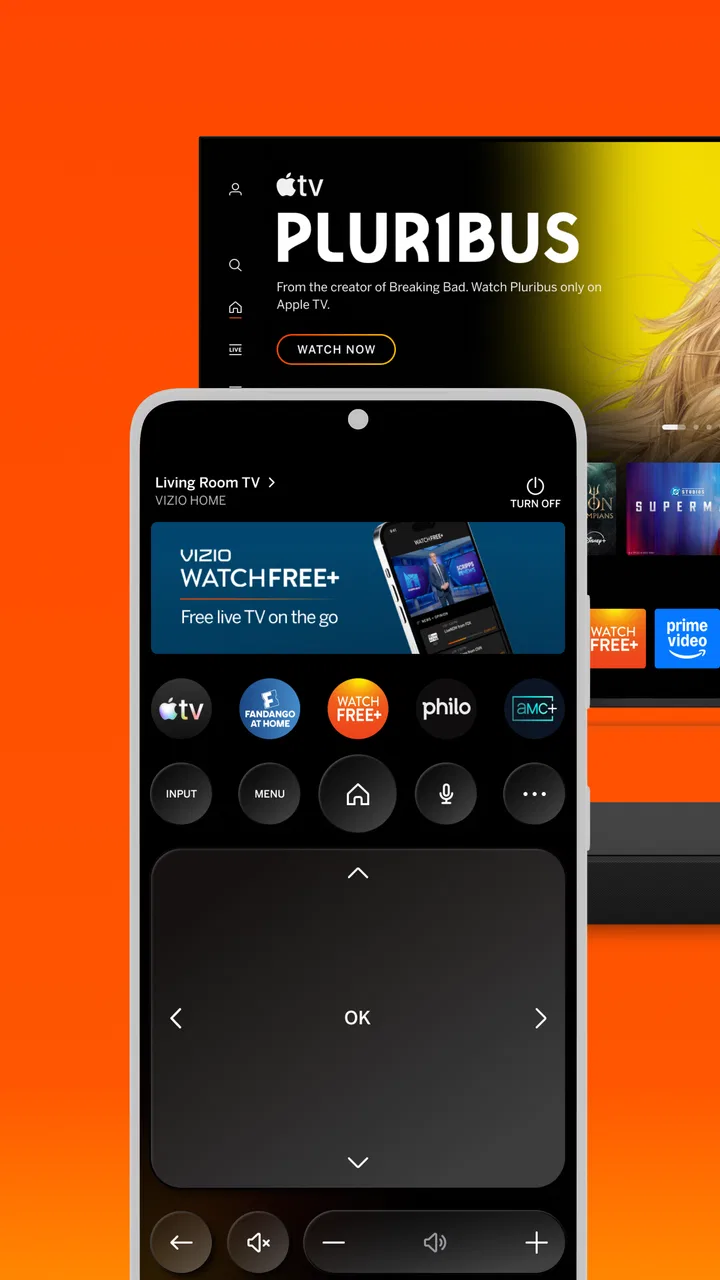
The device-control side is just as important in ordinary use. A phone is often closer than the physical remote, especially when the remote has slipped between sofa cushions or another person is using it. Having control available through the same app reduces that little interruption. It also makes the app more useful than a simple channel guide, because it has a direct relationship with the VIZIO television rather than stopping at recommendations.
The real strength is convenience between browsing and watching. I can use the phone as a discovery surface, then return to the TV as the main screen. That division makes sense: the phone is better for scanning and typing, while the television is better for sitting back and viewing.
What the app feels like during a normal session
My preferred way to use it is not to open it with a rigid plan. I start by checking the live entertainment choices, looking for something that fits the time I have. If I find a program that suits me, the app helps shorten the distance between noticing it and watching it on the television. That is a different experience from launching a traditional streaming app, where the first question is usually which catalog I should search.
This approach is especially comfortable for background viewing. If I am cooking, folding laundry, or taking a short break, I may not want to spend several minutes comparing thumbnails. A live browsing experience gives me a quicker path to “something good enough right now.” It is not intended to replace every subscription service, and I would not use it as my only tool for carefully selecting a particular film. Its value appears when discovery matters more than precision.
The app is also useful when the television is being shared. One person can use the phone to browse while another watches, which avoids interrupting the main screen with repeated menu movement. That small separation can make a noticeable difference in a family room. It is a better fit for collaborative viewing than a setup where one person holds the remote and everyone waits through each search.
A realistic evening workflow
Imagine arriving home with only a short amount of free time. I might not want to sign into several services, remember where a show is located, or commit to a long movie. I can open the app, look through the live choices, and use the VIZIO connection to move toward viewing on the larger screen. If the remote is missing, the phone remains the useful starting point rather than a backup plan that requires a separate application.
That workflow is also useful when guests are choosing what to watch. Instead of passing the remote around while menus change, I can browse on the phone and keep the television focused on the current program until a decision is made. This is one of the less obvious benefits of the design: it turns selection into a quieter activity that does not constantly disrupt the viewing experience.
For a person who watches mostly live entertainment, the app can become a routine check-in tool. For someone who watches only carefully chosen on-demand titles, it may feel less essential. The difference comes down to viewing habits, not technical enthusiasm.
Where device control helps most
The control function is most valuable in moments that are too minor to justify searching for a remote. Adjusting the television from the phone, navigating after opening the app, or taking control when the physical remote is across the room all fit this use. I would not describe it as a replacement for every remote-control habit, because some people simply prefer buttons in their hand, but it is a practical second route.
It also changes how I think about the phone during viewing. Usually, using a phone while watching TV is a distraction. Here, the phone has a specific job: discover, choose, and control. That does not make it automatically better than a remote, but it gives the handset a clear purpose instead of turning it into another source of unrelated notifications and browsing.
One useful habit is to keep the app available before guests arrive or before starting a relaxed viewing session. That way, I am not trying to solve the remote problem after the program has already begun. The app works best when it is treated as part of the television setup, not installed only during an emergency.
What it does not replace
I would not choose this app as a universal replacement for services built around deep on-demand libraries, personal watchlists, or highly specific searches. Its appeal is the VIZIO-centered viewing experience, not the promise of making every entertainment platform behave the same way. If my priority is finding one exact series across several subscriptions, I may prefer a dedicated search tool or the native apps on the television.
It is also not the right choice for someone who does not own or regularly use a compatible VIZIO television. The device-control advantage depends on that relationship. Without it, the most distinctive part of the experience loses much of its purpose, and the app becomes less compelling than a service designed around broad device compatibility.
Tradeoffs, setup expectations, and the people who benefit most
The first tradeoff is focus. Because the app brings together live discovery and control, it can feel more useful to a casual viewer than to a person who wants a highly customized streaming dashboard. I like that it avoids making every session feel like catalog management, but I also accept that it offers less value when I already know exactly what I plan to watch.
The second tradeoff is dependence on the television relationship. The best experience comes when the app and the VIZIO set are part of the same household routine. If the television is rarely used, if viewing happens mostly on other devices, or if the household prefers a different platform, the control feature will not justify much attention.
There is also a difference between convenience and completeness. The app makes live entertainment easier to approach, but convenience does not mean every viewer will find every desired program in one place. I would use it to discover and control viewing, while keeping other services available for specific subscriptions or on-demand choices. That combination is more realistic than expecting one app to replace the entire entertainment setup.
Practical habits that improve the experience
I get more from the app when I use it for decisions that benefit from a larger browsing surface. Scanning live options on a phone can be faster than moving through television menus with directional buttons. Once I have chosen something, I stop treating the phone as the main screen and let the television take over. This keeps the app in its strongest role instead of creating unnecessary phone-based viewing.
- Use the phone for browsing when several people are deciding together.
- Keep the app ready as a backup control method before starting a program.
- Use live discovery for casual viewing, then switch to a dedicated service when you already know the exact title you want.
- Think of the app as part of a VIZIO setup rather than as a standalone replacement for every entertainment platform.
These habits reveal an important distinction: the app saves more mental effort than viewing time. It reduces the number of small choices and interruptions around television use. That may sound modest, but those are exactly the annoyances that make casual entertainment feel like work.
Who should install it
I would recommend it first to VIZIO owners who enjoy browsing live entertainment, share a television with other people, or frequently misplace the remote. It is also a sensible choice for viewers who want a free way to connect everyday phone use with the television without turning the phone into the final viewing destination.
People who watch mostly scheduled or live programming are likely to notice the benefit quickly. The app gives them a more convenient starting point when they do not have a particular title in mind. Households with children or multiple viewers may also appreciate being able to browse without repeatedly taking over the television screen.
On the other hand, I would tell a viewer to skip it if the main requirement is a universal controller for many brands, a comprehensive cross-service search tool, or an on-demand library that replaces existing subscriptions. Those needs point toward a different kind of app. This one is more specific, and that specificity is both its strength and its boundary.
Compatibility and age considerations
On Android, the app requires version 10 or later. That makes it a reasonable option for users with relatively current phones, but anyone holding on to an older Android device should check compatibility before planning around it. The current release is identified as 4.11.0.rc-2.20251205.01.release, so keeping the application updated is a sensible way to avoid unnecessary friction as the television and mobile software evolve.
The content rating is Teen, which is worth noticing for households where a child may use the phone to browse or control the television. I would still treat it as an entertainment-navigation tool rather than handing over unrestricted viewing decisions. Parents should consider the content available through the connected television experience, not just the app interface itself.
My overall judgment
After using it as a companion to a VIZIO television, I see the strongest case for WatchFree+ in its everyday rhythm: browse live choices, make a decision without a long search, and control the television from the same place. It is not trying to be the answer to every streaming problem, and I think the experience is better when I do not ask it to be.
The free price removes the main barrier to trying it, while the large user base shows that the idea has practical appeal. Still, the app only becomes genuinely useful when live discovery and VIZIO device control match the way I watch. If that describes your home, it can make casual viewing noticeably smoother. If you prefer carefully curated on-demand catalogs or use several television brands, another option may fit better.
My recommendation is straightforward: VIZIO owners should try it, especially if the remote is often inconvenient or choosing something to watch takes longer than it should. It is best understood as a bridge between a VIZIO TV and the person using it, not as a universal streaming replacement. That focused role is what makes it worthwhile.
FAQs for VIZIO | WatchFree+
01What is VIZIO | WatchFree+?
VIZIO | WatchFree+ is a free streaming platform available on VIZIO SmartCast TVs. It offers a variety of live channels and on-demand content without requiring any subscriptions, logins, or fees. Users can enjoy news, sports, entertainment, and more, making it a convenient option for those looking to cut the cord.
02Do I need a VIZIO TV to use WatchFree+?
Yes, WatchFree+ is specifically designed for VIZIO SmartCast TVs. The app comes pre-installed on these devices, allowing users to easily access its content. If you have a different brand of smart TV or streaming device, WatchFree+ will not be available for you.
03Is there any cost associated with using WatchFree+?
No, WatchFree+ is completely free to use. There are no subscription fees, hidden charges, or even login requirements. The platform is ad-supported, which means you may encounter commercials during your viewing experience, similar to traditional television.
04What kind of content is available on WatchFree+?
WatchFree+ offers a wide range of content including live news, sports, movies, and TV shows. The platform features channels like NBC News, TMZ, and other popular networks, providing a diverse selection for various tastes. However, the availability of specific channels and programs can vary over time.
05Can I use WatchFree+ on multiple devices?
WatchFree+ is currently available only on VIZIO SmartCast TVs, so you cannot directly use it on other devices like smartphones or tablets. However, if your VIZIO TV supports screen casting, you might be able to mirror the content to other devices within your home network.
Pros
- Free access to a wide range of channels.
- No subscription or sign-up required.
- User-friendly interface with easy navigation.
- Regular updates with new content.
- Compatible with multiple devices.
Cons
- Limited to US viewers only.
- Occasional ads during streaming.
- Requires stable internet connection.
- Some channels may have buffering issues.
- Limited on-demand content options.

VIZIO | WatchFree+
Gallery